
At Microsoft Build 2026, Microsoft introduced Fabric Apps, a new way to build, deploy, and share data-driven web applications directly inside Microsoft Fabric. As someone who has been working with Fabric since its early days, I wanted to move beyond the announcement and build something real. Here is what I found.
If you have used Microsoft Fabric before, you are already familiar with Power BI reports, pipelines, and Semantic Models. Fabric Apps adds something new to that list: a first-class item type for building web applications, not reports, that live inside your Fabric workspace.
The simplest way to think about it: a Fabric App is a full web application built with HTML, CSS, and TypeScript that runs in the browser. It is hosted by Microsoft Fabric and secured by your existing Entra ID identity. It connects directly to your Fabric data and can do things that a Power BI report was not designed to do.
There are currently two types of Fabric Apps. An operational app provisions a managed SQL database and exposes it through a GraphQL API. An analytical app, also called a data app, connects to an existing Fabric Semantic Model and queries it using DAX, the same way a Power BI report does. This article focuses on the data app, because that is where the most immediate opportunity lies for BI and analytics teams.
This is the question most data professionals will ask first. The honest answer: it is a fundamentally different development model, not just a different visual surface.
In Power BI, you drag visuals onto a canvas and the tool generates DAX queries, handles cross-filtering, and applies a theme. The code is hidden. In a Fabric data app, you write every part of it. Your DAX queries live in explicit .dax files. Your visuals are defined using libraries like Vega-Lite or D3.js. Your layout is React and CSS.
That is more complexity, but it also means more control. The table below captures the most meaningful differences between the two approaches:

Neither approach is universally better. Power BI remains the right choice for self-service analytics and standard business reporting. Fabric Apps are compelling when you need a highly customised experience, tighter integration with AI workflows, or capabilities the Power BI rendering engine cannot deliver.
To move beyond theory, I built a proof of concept: a Claims Executive Dashboard using a Microsoft Fabric Semantic Model as the data source. The goal was to recreate the kind of bespoke executive dashboard that organizations typically struggle to produce inside Power BI without significant workarounds.
The dashboard includes KPI tiles for total claims, average processing time, and resolution rate, alongside a monthly trend line and a regional breakdown with cross-filtering. All data is queried live from the Semantic Model.
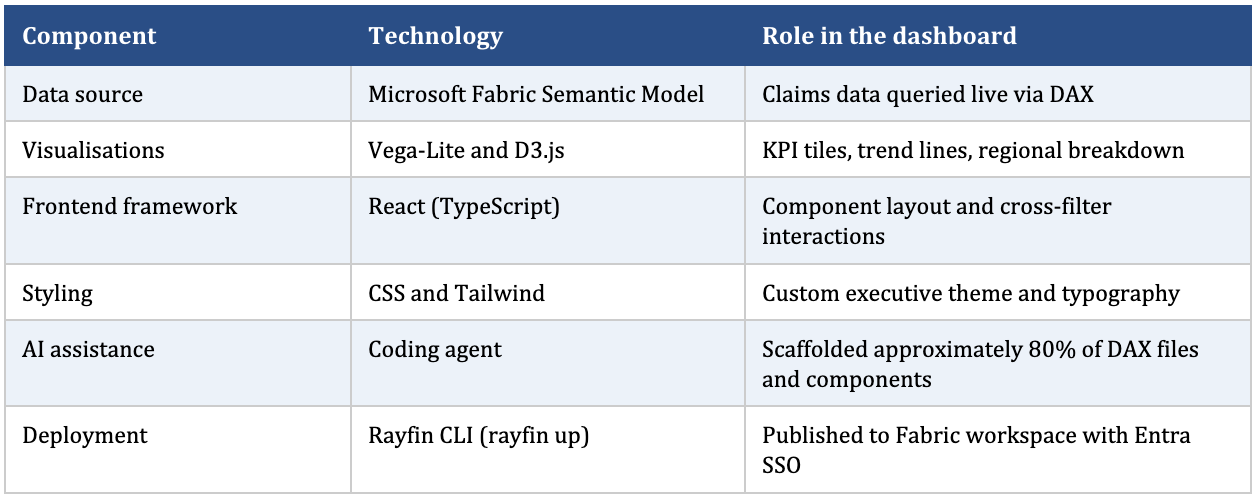

The single most striking observation: a coding agent handled roughly 80 percent of the scaffolding work. It generated the DAX query files, wired up the React components, and applied the initial CSS theme. What typically takes a developer several days to establish was functional within a few hours. The remaining 20 percent, which included refining the DAX logic, adjusting the visual hierarchy, and validating the data, required hands-on review.
One underappreciated benefit emerged immediately: because the DAX is in an explicit file, you can open it in Tabular Editor or DAX Studio and test it in isolation. Anyone who has spent time debugging an auto-generated Power BI query in Performance Analyzer will understand why this matters.
After building and deploying the POC, here is a practical view of where Fabric Apps deliver clear value and where caution is warranted.

The limitation that deserves the most attention is AI dependency. Most Power BI and Fabric developers do not have a background in web development. Without that foundation, a team building Fabric Apps will rely entirely on AI agents to generate and maintain the code. That is workable today, but it creates fragility. If tooling changes, costs rise, or something breaks in production, a team that never understood the underlying code will struggle.
The practical recommendation: use AI to accelerate but invest enough time to understand what has been built. You do not need to become a React developer. You do need to know where the DAX files live, what the deployment command does, and how to read an error message.
For business stakeholders, the most relevant implication is straightforward: the quality ceiling for dashboards and analytics experiences has risen. Designs that previously required custom embedded solutions with external hosting, separate authentication, and bespoke APIs can now be delivered inside Microsoft Fabric, using the same Semantic Models your organization already maintains.
For technology and data engineering teams, Fabric Apps introduce a new surface to consider alongside Power BI reports. The key questions to start with are:
Fabric Apps do not replace Power BI. For the majority of organizations, Power BI reports will remain the primary reporting tool for the foreseeable future. Fabric Apps add a new option for teams that need more flexibility, higher visual fidelity, or deeper integration with modern software development practices.
For organizations in the middle of a Fabric migration or building out their OneLake data estate, this announcement is particularly relevant. The Semantic Model you are investing in today is not just the foundation for Power BI reports. It is now also the foundation for a new class of data applications. Building it well from the start, with the right governance, naming conventions, and DAX patterns, pays dividends across both surfaces.
At Hexaview Technologies, we have been working with Microsoft Fabric across data engineering, analytics, Power BI implementation, and Fabric migration engagements. The Claims Dashboard POC confirmed something we observe consistently in client work: the teams that get the most from new Fabric capabilities are the ones who have invested in a clean, well-documented Semantic Model first. Everything else builds on that foundation.
If your organization is exploring Microsoft Fabric, planning a Fabric migration, or looking to maximize the value of your existing Power BI investment, Hexaview can help. As a Microsoft Fabric consulting company, we work with organizations across data engineering, analytics, Power BI implementation, and Microsoft Fabric migration engagements to build scalable, business-ready data solutions. Our team can run a focused proof of concept against your Semantic Model, assess your current environment, and create a practical roadmap tailored to your goals.
Reach out to start the conversation.
1. What are Microsoft Fabric Apps?
Microsoft Fabric Apps are code-first web applications that run natively inside Microsoft Fabric. They allow developers to build custom data experiences using technologies like React, TypeScript, HTML, CSS, and DAX while connecting directly to Fabric Semantic Models or operational data.
2. Do Microsoft Fabric Apps replace Power BI?
No. Fabric Apps are not a replacement for Power BI. Power BI remains the best choice for self-service analytics, dashboards, and standard business reporting. Fabric Apps are designed for scenarios where organizations need highly customized user experiences, advanced interactivity, or application-like functionality.
3. Can Fabric Apps use my existing Power BI Semantic Model?
Yes. One of the biggest advantages of analytical Fabric Apps is that they can connect directly to your existing Fabric Semantic Models. This lets you reuse your current data model, DAX measures, security, and governance without rebuilding them.
4. Do I need web development experience to build Fabric Apps?
Some knowledge of modern web development is helpful because Fabric Apps are built using React and TypeScript. However, AI coding assistants can generate much of the initial application structure, allowing Power BI and Fabric professionals to get started more quickly while still reviewing and understanding the generated code.
5. When should I choose a Fabric App instead of a Power BI report?
Consider a Fabric App when you need complete control over the user interface, custom workflows, advanced visualizations, or an application-like experience that goes beyond what Power BI's built-in visuals can provide.
6. Are Fabric Apps secure?
Yes. Fabric Apps are hosted within Microsoft Fabric and use Microsoft Entra ID for authentication. They can also leverage the security and governance already defined for your Fabric environment and Semantic Models.
7. How can my organization get started with Microsoft Fabric Apps?
A good first step is to evaluate your existing Semantic Model and identify business scenarios where a custom application would provide more value than a traditional report. A proof of concept using your own data can help validate the approach before wider adoption.




.svg)

.svg)